Designing & Uploading a Direct Mail File
(Need Print & Ship file specs instead? Click here: https://support.quantumdigital.com/hc/en-us/articles/115002456626-Designing-Uploading-a-Digital-Print-File)
Designing Mail Pieces
All files must be 300 DPI in resolution, to the specified sizes below, and in PDF, JPG or PNG format. Any design not uploaded to the correct specifications will be automatically resized to fit the card. If you choose to do this, some parts of your design may appear proportionally distorted, reduced, pixilated or trimmed inappropriately.
Using Digital Photos
If using a digital camera, select the highest quality setting available on the camera. Do not scan photos from business cards, magazines, newspapers, color laser prints or inkjet prints — they usually contain dot patterns that conflict with our printing system. Please scan from the original, professionally-developed photographic print whenever possible.
Direct Mail File Specifications & Detailed Measurements
Jumbo Image Side

Layout | Canvas Size | Trimmed Size | Design Area | Resolution |
|---|---|---|---|---|
Horizontal | 8.75” x 5.75” | 8.5” x 5.5” | 8” x 5” | 300 dpi |
Vertical | 5.75” x 8.75” | 5.5” x 8.5” | 5” x 8” | 300 dpi |
0.125” will be trimmed off all sides of full bleed design. |
Jumbo Address Side with Contact

Layout | Canvas Size | Trimmed Size | Design Area | Resolution |
|---|---|---|---|---|
Vertical | 4.8” x 5.75” | 8.5” x 5.5” | 4.425” x 5” | 300 dpi |
0.125” will be trimmed off all sides, affecting top, bottom and left edges of full bleed design. |
Jumbo Address Side without Contact

Layout | Canvas Size | Trimmed Size | Design Area | Resolution |
|---|---|---|---|---|
Horizontal | 8.75” x 5.75” | 8.5” x 5.5” | 8” x 5” | 300 dpi |
0.125” will be trimmed off all sides of full bleed design. |
Address Area is 3.9” x 2.45” from bottom right corner of full bleed design. |
Standard Image Side

Layout | Canvas Size | Trimmed Size | Design Area | Resolution |
|---|---|---|---|---|
Horizontal | 5.75” x 4.5” | 5.5” x 4.25” | 5” x 3.75” | 300 dpi |
Vertical | 4.5” x 5.75” | 4.25” x 5.5” | 3.75” x 5” | 300 dpi |
0.125” will be trimmed off all sides of full bleed design. |
Standard Address Side with Contact

Layout | Canvas Size | Trimmed Size | Design Area | Resolution |
|---|---|---|---|---|
Vertical | 3.12” x 3.62” | 5.5” x 4.25” | 2.745” x 3.245” | 300 dpi |
0.125” will be trimmed off all sides, affecting top and left edges of full bleed design. |
Standard Address Side without Contact

Layout | Canvas Size | Trimmed Size | Design Area | Resolution |
|---|---|---|---|---|
Horizontal | 5.75” x 3.62” | 5.5” x 4.25” | 5” x 3.245” | 300 dpi |
0.125” will be trimmed off all sides, affecting left, top and right edges of full bleed design. |
Address Area is 2.63” x 1.33” from bottom right corner of full bleed design. |
Panoramic Image Side

Layout | Canvas Size | Trimmed Size | Design Area | Resolution |
|---|---|---|---|---|
Horizontal | 11.25” x 5.92” | 11” x 5.667” | 10.5” x 5.17” | 300 dpi |
.125” will be trimmed off all sides. |
Panoramic Address Side
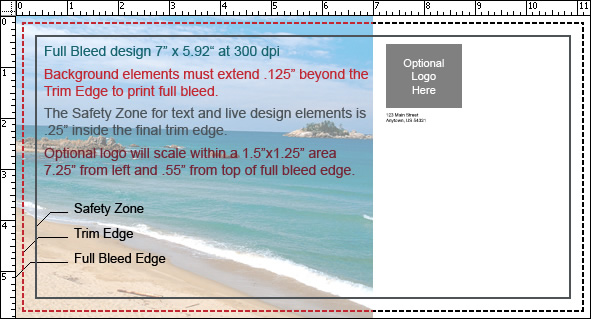
Layout | Canvas Size | Trimmed Size | Design Area | Resolution |
|---|---|---|---|---|
Horizontal | 7” x 5.92” | 11” x 5.667” | 6.625” x 5.17” | 300 dpi |
.125” will be trimmed off all sides, affecting the top, left-hand and bottom edges of creative area |
Mailed Flyer Image Side
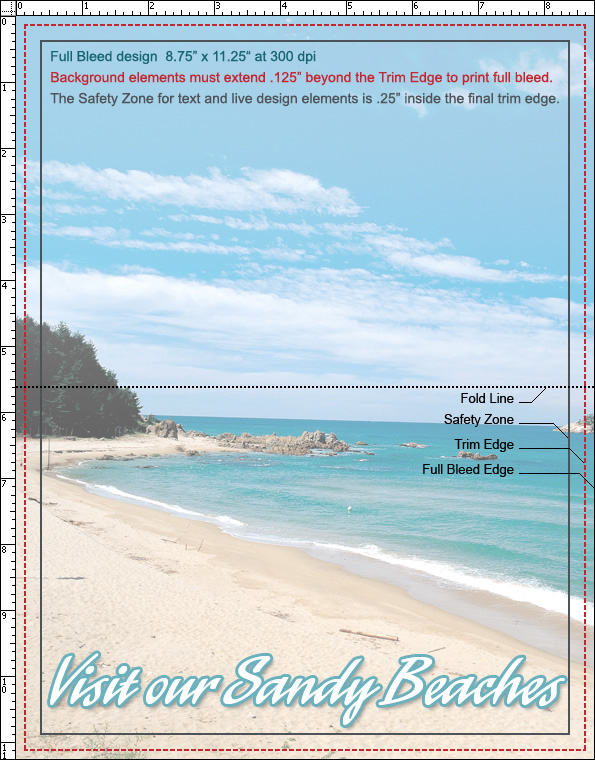
Layout | Canvas Size | Trimmed Size | Design Area | Resolution |
|---|---|---|---|---|
Vertical | 8.75” x 11.25” | 8.5” x 11” | 8” x 10.5” | 300 dpi |
.125” will be trimmed off all sides, folded in half and tabbed |
Mailed Flyer Address Side
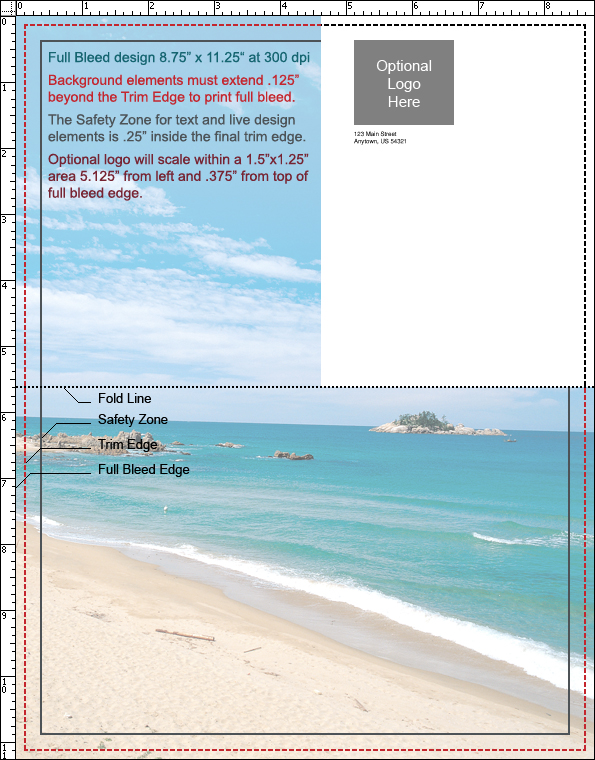
Layout | Canvas Size | Trimmed Size | Design Area | Resolution |
|---|---|---|---|---|
Vertical | 8.75” x 11.25” | 8.5” x 11” | 8” x 10.5” | 300 dpi |
.125” will be trimmed off all sides, affecting the top, left-hand and bottom edges of creative area, white box for postal indicia/addressing will be imposed over top right-hand corner of address side at 4.625” to full bleed edge of 8.75”. |
Updated on: 27/05/2026
Thank you!